Understand your heart rate variability. Explore ECG-based HRV measurement, clear results and breathing biofeedback with Dinamika. A recording takes about five minutes, helping you compare your responses to stress, rest and everyday changes over time.
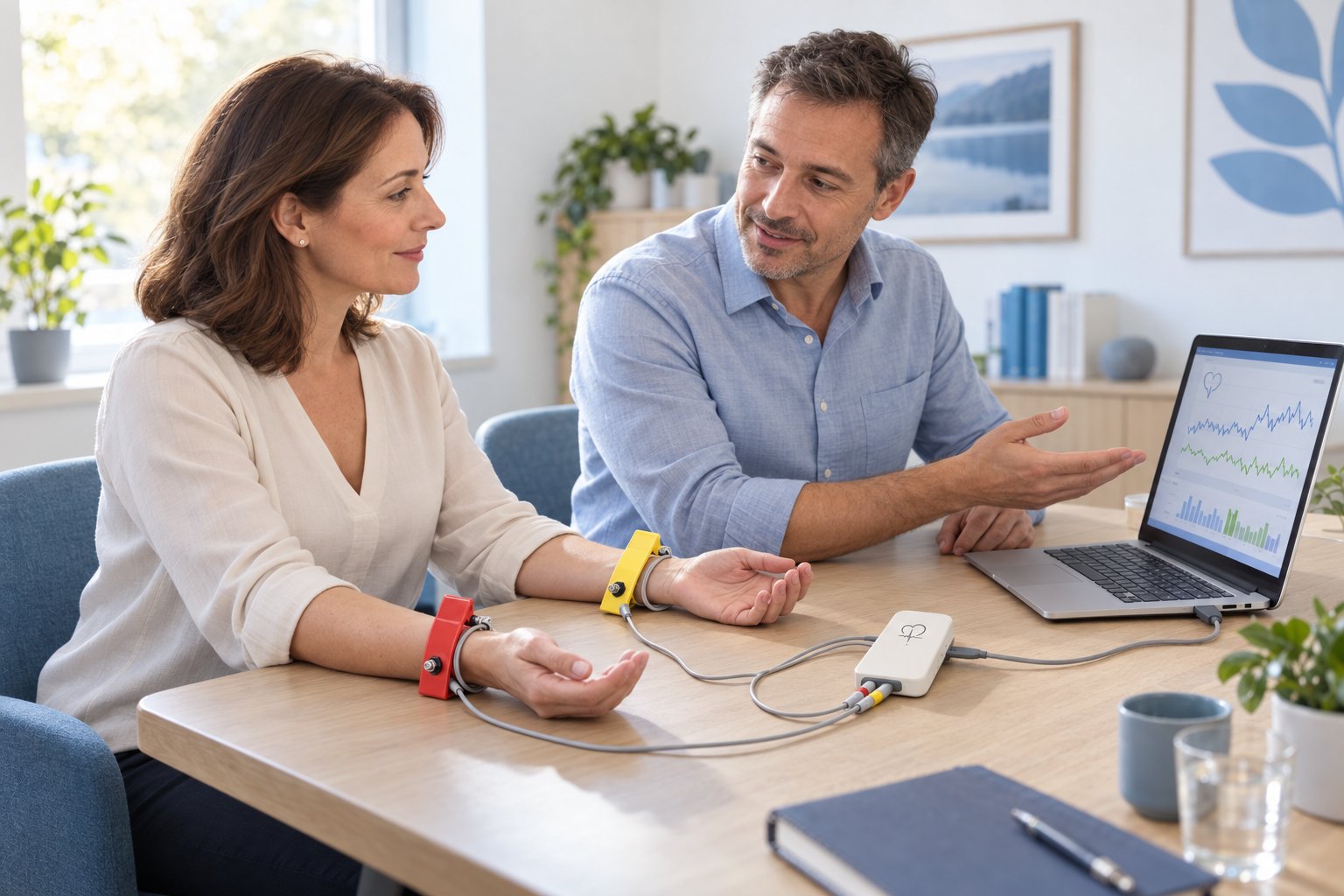
Dinamika in a personal consultation environment: wrist electrodes, recording module and overview of results on the computer. AI-generated illustration.
A five-minute recording. A clearer view over time.
Dinamika records 300 heartbeats during a resting measurement — approximately five minutes, depending on your heart rate. Repeat recordings under similar conditions to follow your own HRV trends. The system combines measurement sessions and breathing exercises; it is not an all-day wearable monitor.
What is Dinamika?
Dinamika combines single-channel ECG with heart rate variability analysis. From the recording of 300 heartbeats, it processes more than 50 parameters in the time, geometric, non-linear and frequency domains. It offers the results as numerical values, graphs and interpretive overviews.
The software brings together standard HRV indicators, breathwork tools and holistic models. The individual tabs below explain what they show and what they are for.
Who is HRV measurement useful for?
For therapists, counselors, doctors, sports trainers and coaches who want to work with HRV records and track their progress. It is also used for home long-term monitoring, relaxation and breathing biofeedback. Training, correct measurement procedure and interpretation in context are important for meaningful work.
Behind every record is a person. The interview and own notes complete the view of the HRV results. Illustration photo: Polina Zimmerman / Pexels.
Dinamika for your practice and home measurements
Listed as HRV Screening HV at Zapper Store: $5,600 USD (previously $6,600). Price checked October 22, 2026. See the product page for current pricing, availability and order conditions.
Heart rate variability describes variability in the time intervals between heart beats. Even with a calm heartbeat, the heart does not beat at perfectly equal intervals.
HRV and heart rate
Heart rate indicates the number of beats per minute. HRV tracks the differences between individual intervals. Two recordings with the same average heart rate can therefore have different variability.
The analysis is based on the R–R intervals obtained from the heart signal. Their processing makes it possible to monitor connections with autonomic regulation and to compare changes during repeated recordings.
Stress, rest and trends over time
For example, breathing, body position, time of day and signal quality affect the result. It makes the most sense to compare your own recordings made with the same procedure. Notes about sleep, training, rest, or subjective state help put the numbers into context.
Rest area. When tracking changes over time, also record your normal daily routine. Illustration photo: Atlantic Ambience / Pexels.
HRV MONITORING • DINAMIKA
How the HRV measurement with Dinamika works
Device connection, short recording and overview of results. The basic measurement includes 300 heartbeats, which takes approximately five minutes depending on the heart rate.
Preparation and connection
Connect the device to the computer and place the electrodes according to the instructions. Check electrode contact and ECG quality before starting. To compare measurements, keep the same time of day, body position and conditions.
Recording and checking the signal
Do not move unnecessarily during the resting recording and follow the operator's instructions. The software will display the ECG and rhythmogram. Interference and the quality of captured intervals need to be assessed before evaluation.
Reviewing results and next steps
The results can be browsed by individual tabs, compared with history or used for work with breathing biofeedback. Maintain a comparable procedure when monitoring response to exercise or other stimulus; the change in the index alone does not prove a therapeutic effect.
HRV MONITORING • DINAMIKA
Dinamika software: from recording to results
Twenty panels, twenty views of results. For each sample, you will find an explanation of the displayed data and its use.
How to read individual panels
HRV numeric indicators describe the characteristics of the recorded heart intervals. Summary indices, biological age, biorhythm outlooks and energy maps are other software calculations or interpretations. It is important to distinguish between these different types of outputs.
Images can be clicked for larger view. The interface may vary by version.
1. Heart rate variability indices
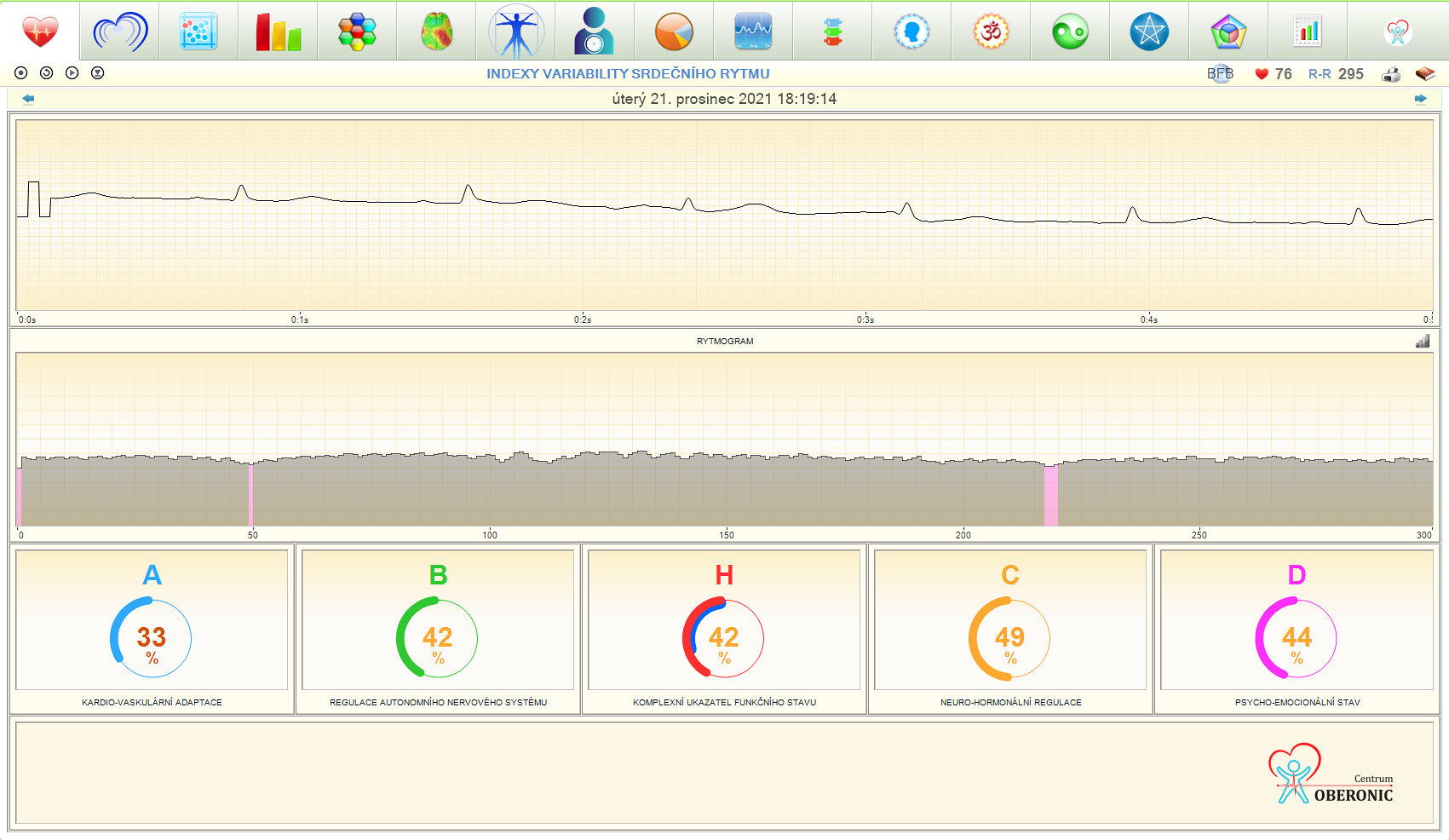
The ECG curve captures heart activity, the rhythmogram the variability of intervals between contractions. Aggregate indices display the software evaluation of adaptation and regulation processes. From this panel, you can start breathing biofeedback, save exercises and monitor rhythm changes during breathing, meditation or other stimuli.
ECG, rhythmogram and five summary indexes on the opening panel. It serves to check the record and first orientation in the results.
2. Regulatory system strain
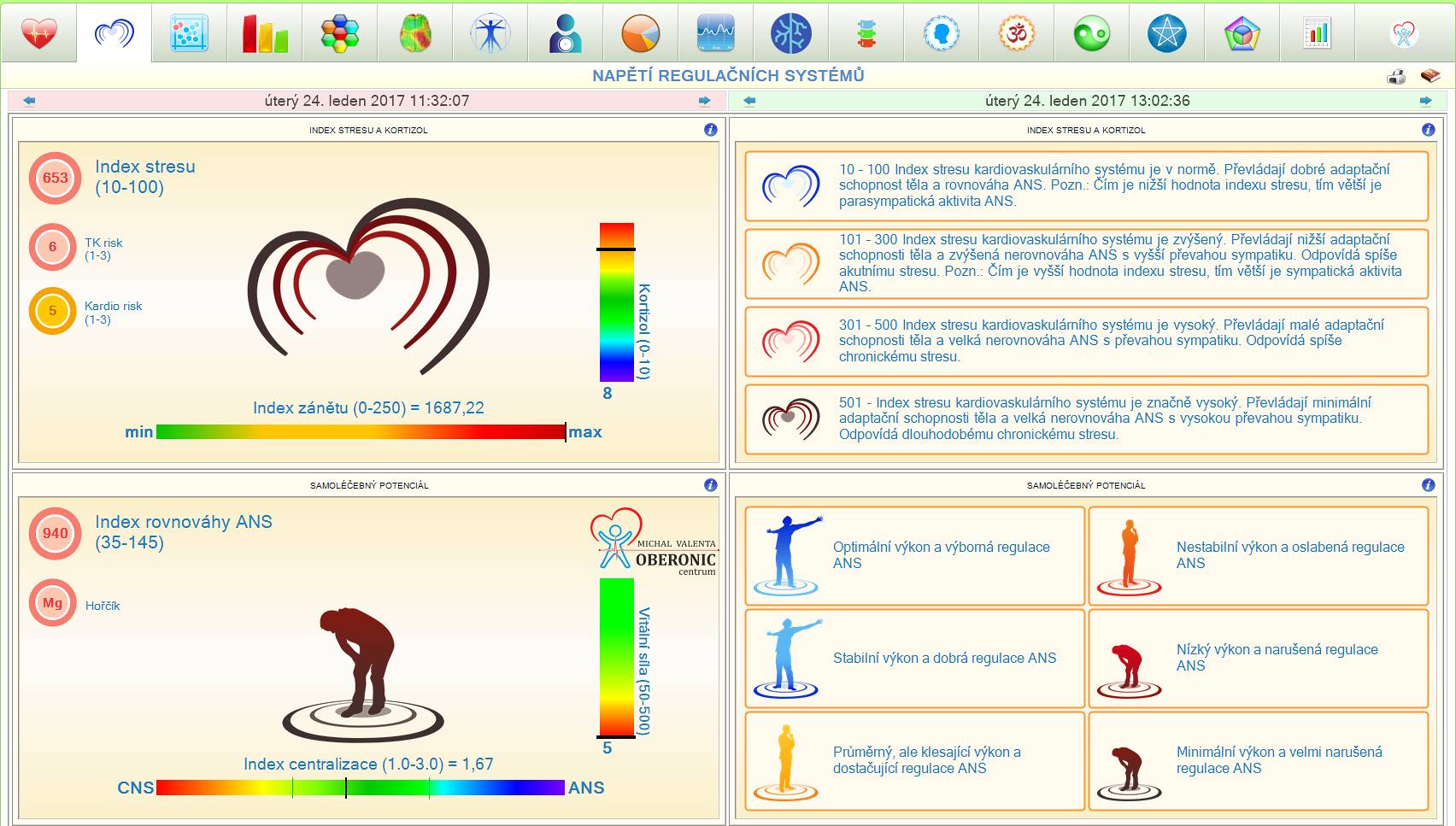
Baevsky's stress index expresses the tension of heart rhythm regulation. The panel supplements it with the balance of activity and rest, the degree of centralization of control and the model assessment of regenerative reserves. Changes can be tracked between individual records. It is not a laboratory measurement of cortisol or evidence of inflammation.
Graphical evaluation of stress index and tension of control systems. It helps to compare the load during repeated measurements.
3. Regulation of the autonomic nervous system
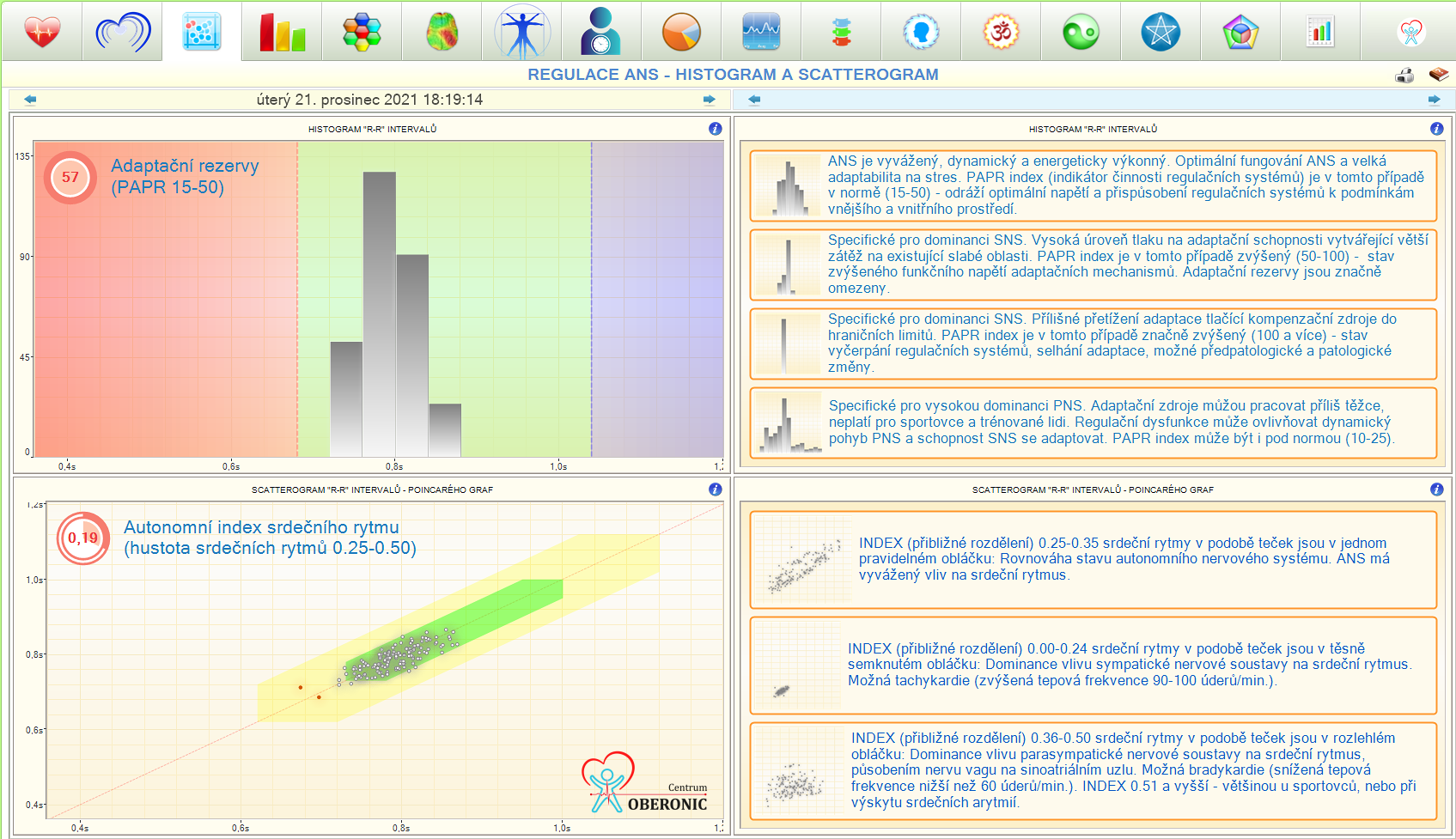
Histogram shows the distribution of R–R intervals. A scatterogram compares adjacent intervals and captures the structure of their variability. The geometric and non-linear indicators are complemented by the PAPR index, which the software uses when evaluating adaptation reserves. The panel thus offers a different view of the same heart record than the heart rate itself.
Histogram and scatter plot of heart intervals. They show the distribution and variability of the measured data.
4. Spectral analysis
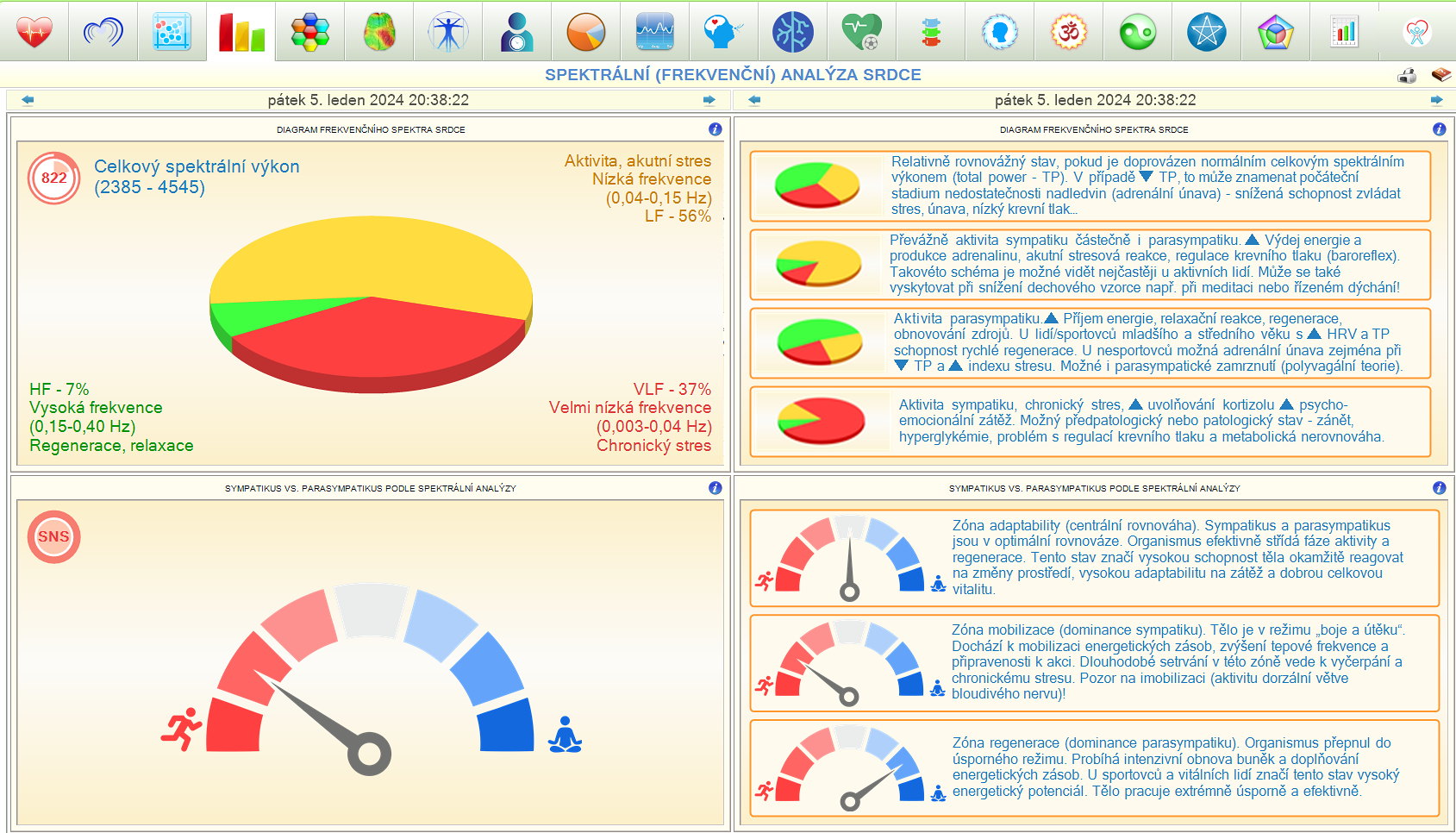
Spectral analysis divides cardiac interval variability into HF, LF and VLF frequency bands. The panel contains their representation, total spectral power and software-interpreted balance of activation and relaxation. Color separation makes orientation easier; individual bands must be interpreted in the context of recording length and breathing.
Spectral analysis with color representation of frequency bands and an overview of activation and relaxation.
5. Neuro-hormonal regulation
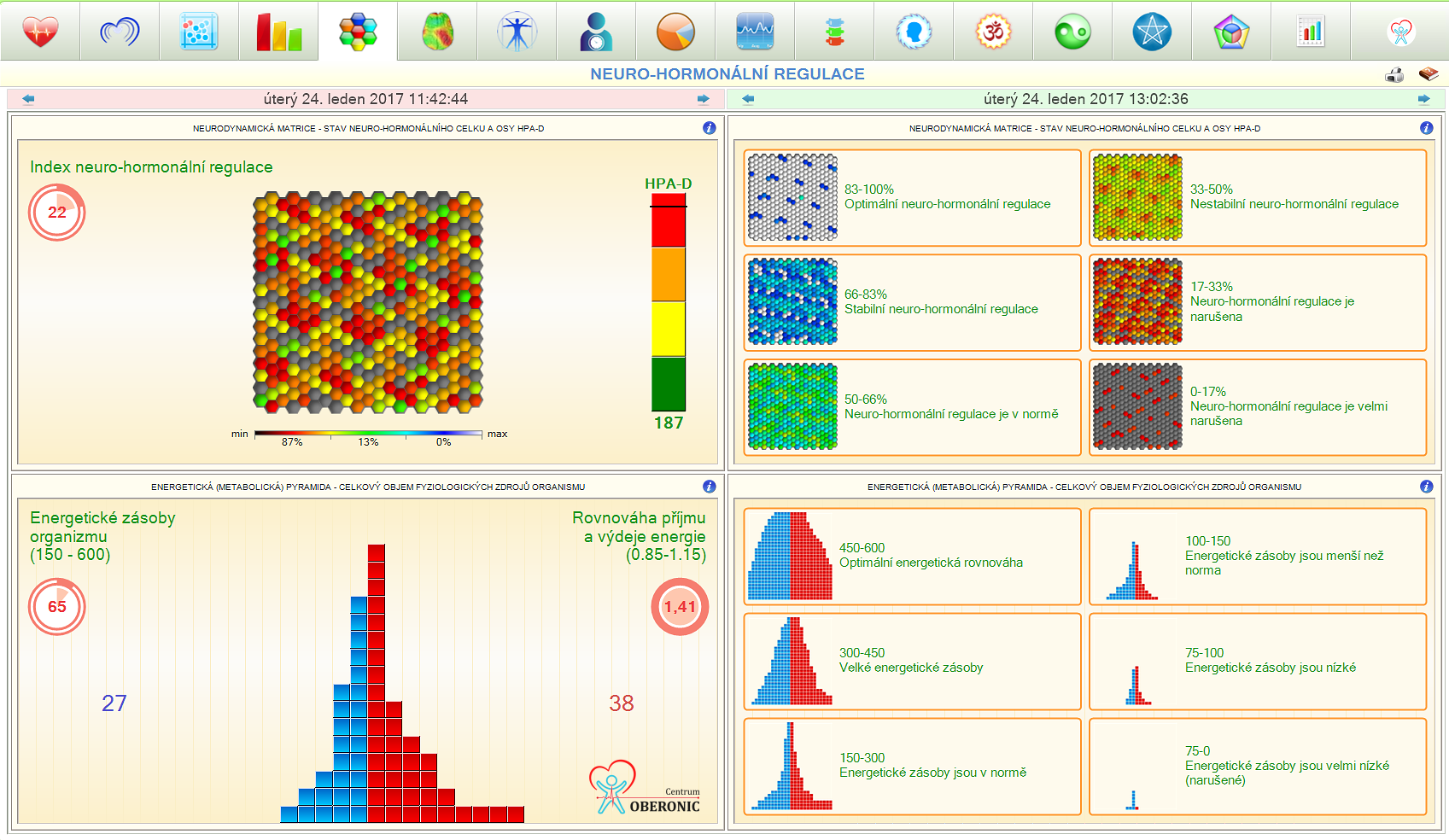
The energy pyramid presents a software model of the relationship between recovery and resource expenditure. The blue area represents renewal; the red area represents expenditure. Accompanying indices model hormonal load and the regulatory response to stress. These calculations are based on HRV; they do not directly measure hormone levels or examine adrenal function.
Energy pyramid and indices of neuro-hormonal regulation. The screen translates the results into a model of energy supply and recovery.
6. Psycho-emotional state
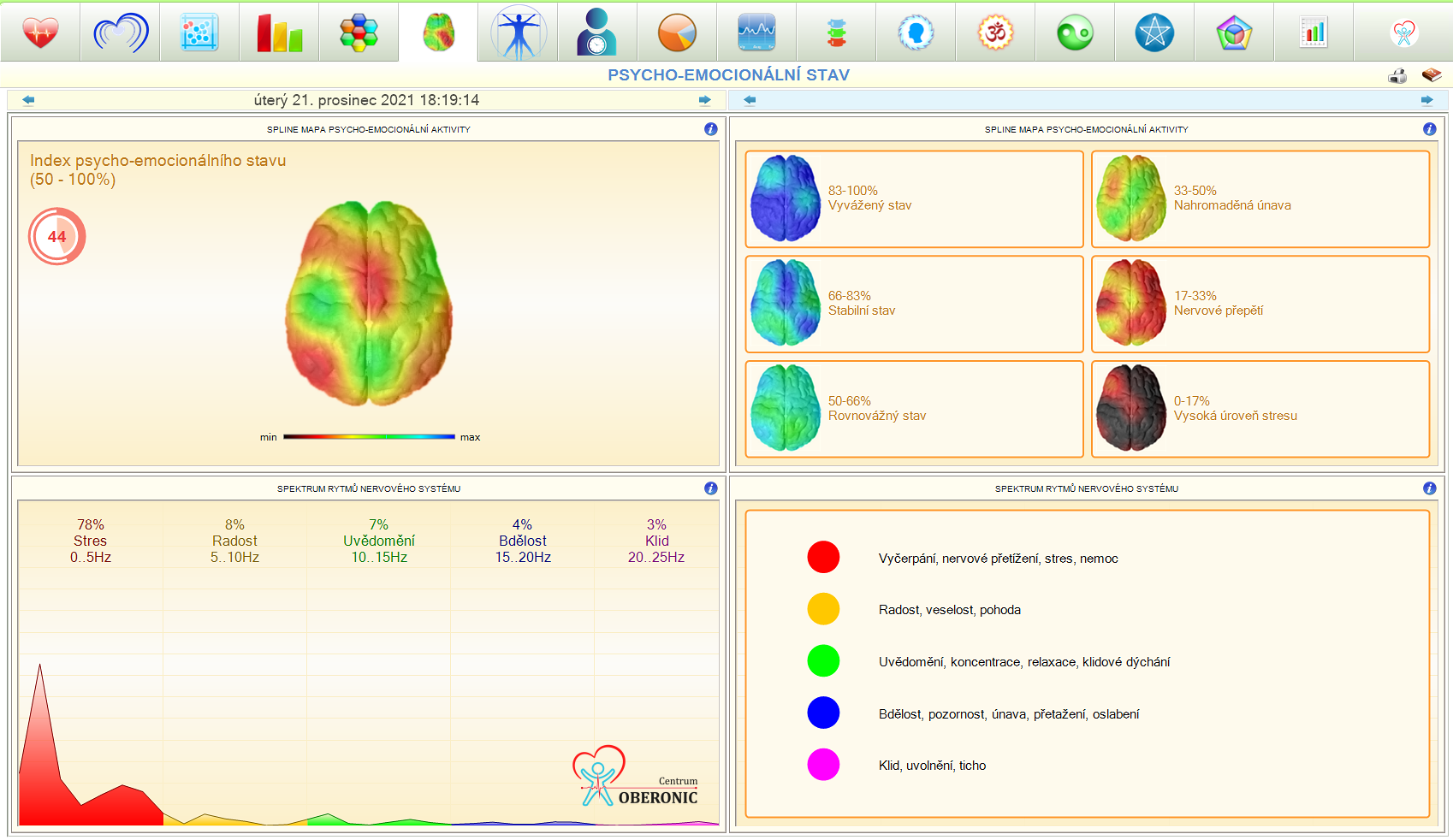
Summary index and color map show software interpretation of psycho-emotional stress. The spectrum of rhythms complements the model view of the functional interplay of the central nervous system. The panel is used for orientation in this interpretation model and for comparing measurements; brain imaging is not an EEG or a direct measurement of brain activity.
Color map, summary index and spectrum of rhythms for the interpretation of psycho-emotional state.
7. Analysis of biorhythms of body systems
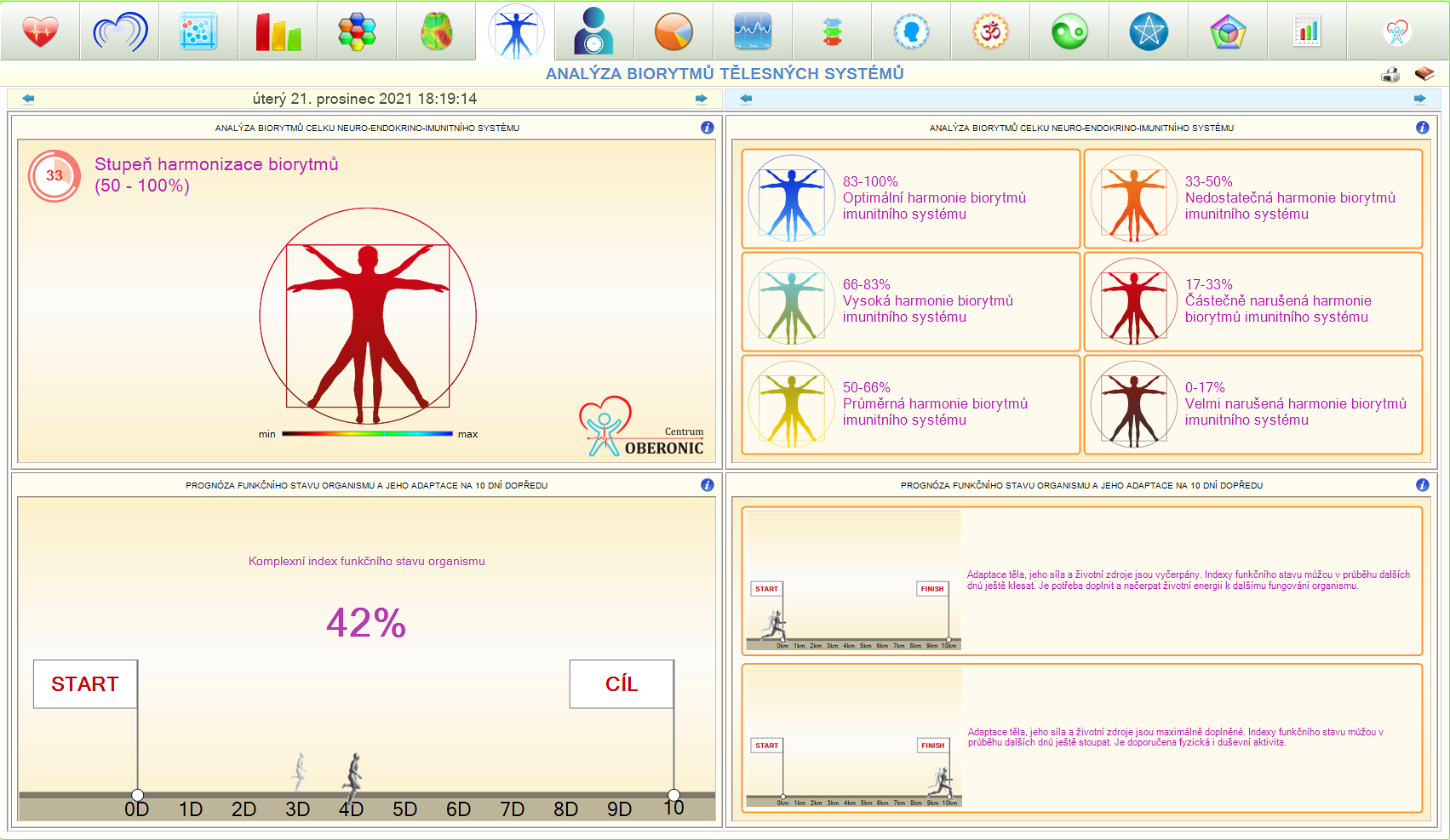
The panel combines model indicators of the harmonization of physiological rhythms and the interplay of regulatory mechanisms. The software includes a ten-day functional status outlook and a balance of expected resource utilization and recovery. The outlook is based on the current record and represents a model forecast, not a sure prediction of future health.
Overview of biorhythms and model ten-day outlook. It serves to guide the estimation of further development according to the software.
8. Calendar and biological age
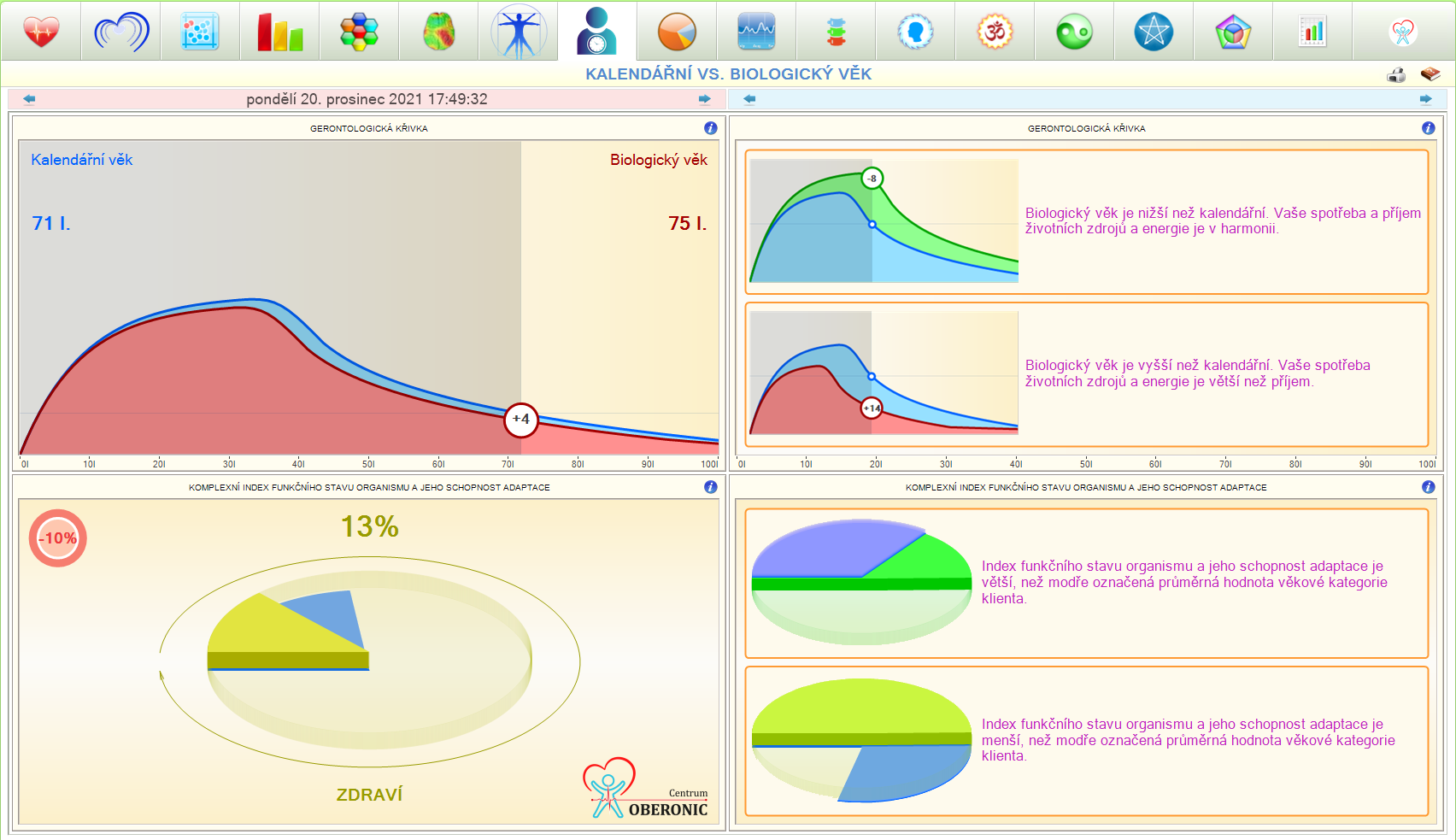
The gerontological curve and age norm compares the result to age group reference values. The software converts the selected indices into an estimate of biological age. Such a comparison offers comprehensible feedback to the development of records; it is a calculation of a specific model, not an unequivocal determination of the actual age of the organs.
Graphical comparison of calendar age and software estimation of biological age including age standard.
9. Comprehensive analysis
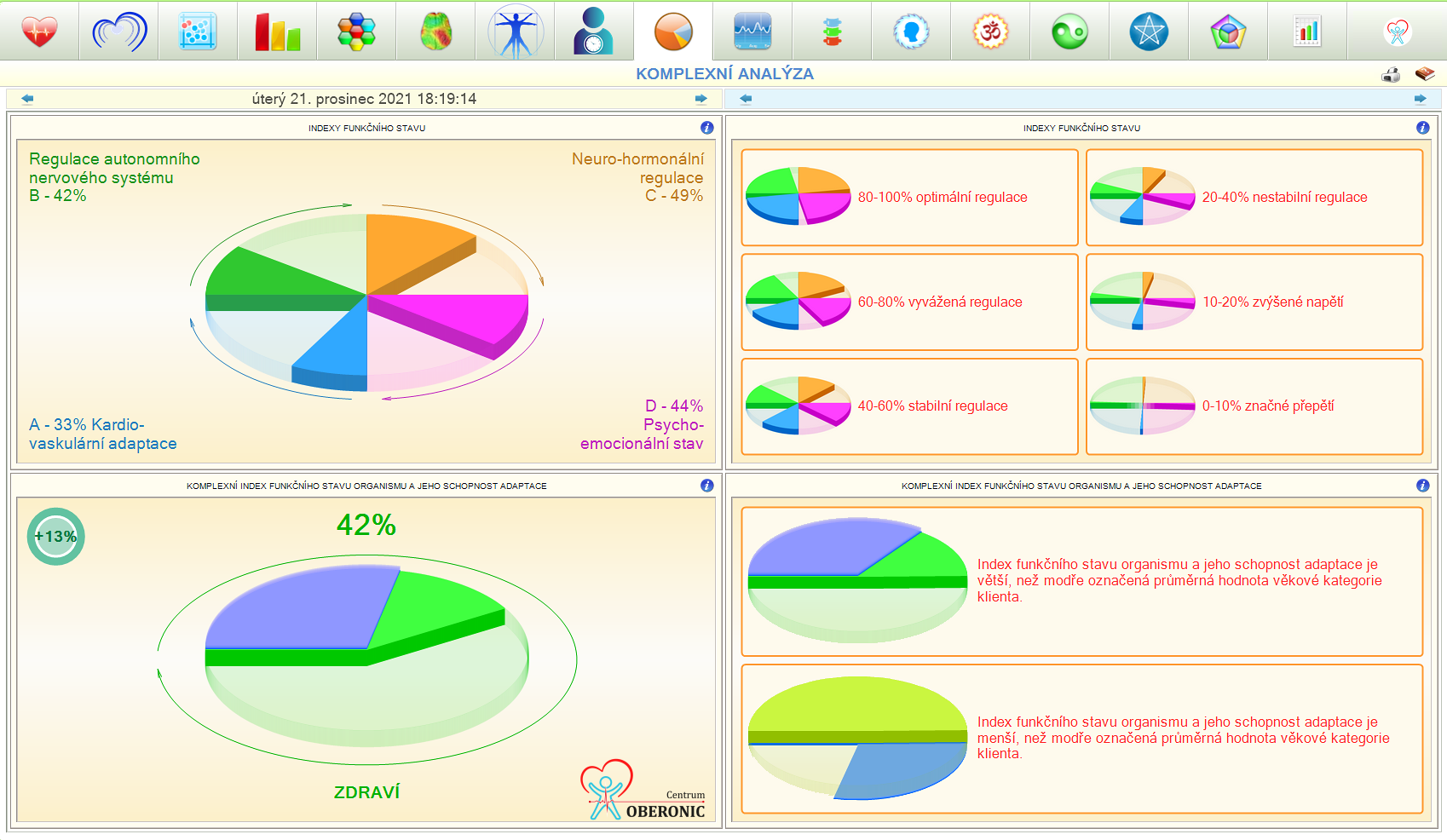
The summary panel combines several sub-indexes into a common overview. It includes a comprehensive indicator of functional status, a symbolic health and fitness index and an age comparison of HRV. It allows you to quickly orientate yourself in the result and then go to the individual parameters from which the evaluation was created.
Summary indices and comparison by age group. The panel summarizes the basic analysis in one place.
10. Development of indicators over time
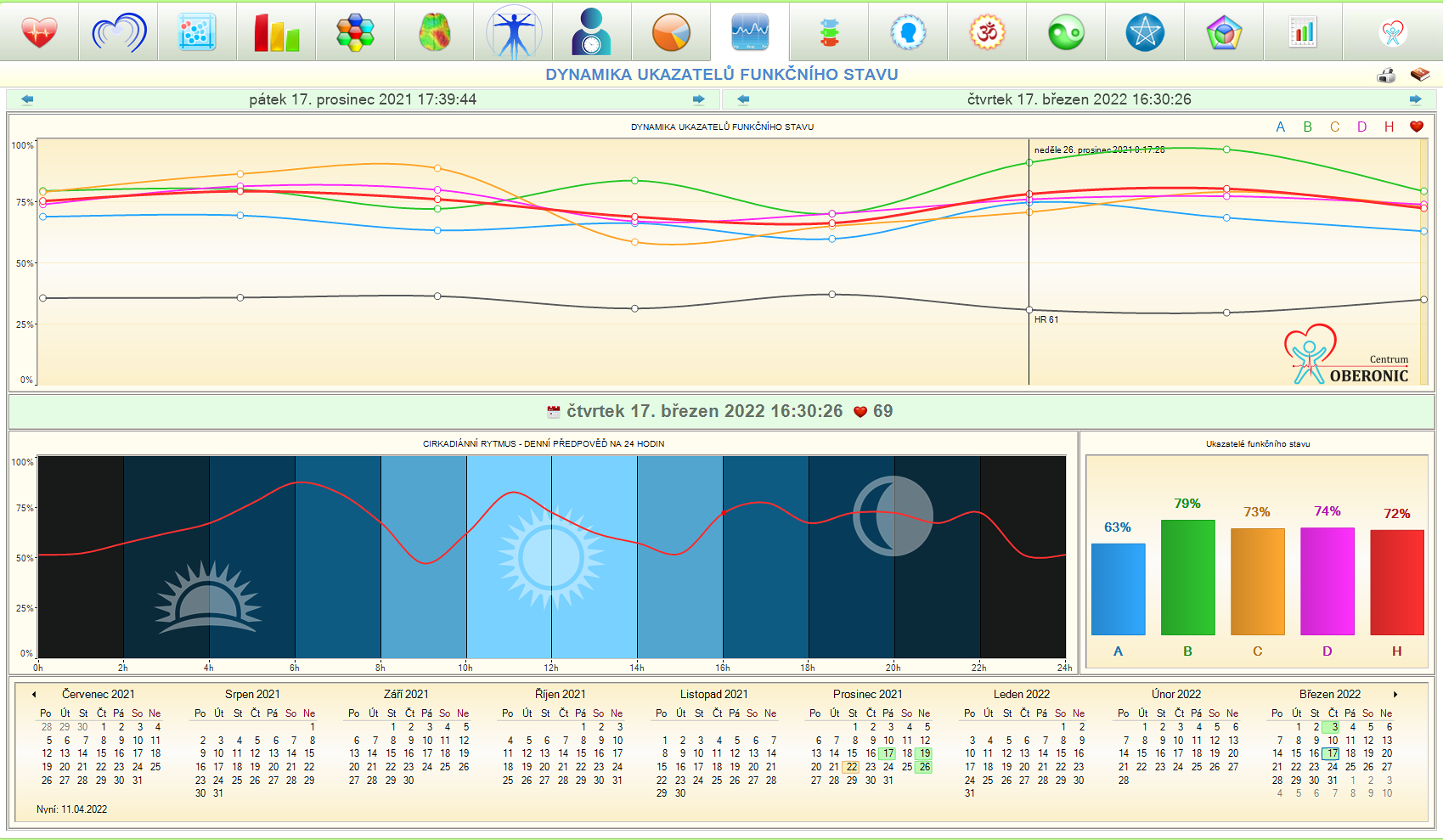
The measurement history allows you to browse past records and monitor changes after adjusting the daily routine or when working with the client. It is complemented by a model of the circadian course for 24 hours and the energy balance during the day. Comparable conditions and notes on individual measurements are important for the interpretation of trends.
Results history and daily curve. They help track long-term development and software model daily rhythms.
11. PFK and functional breathing
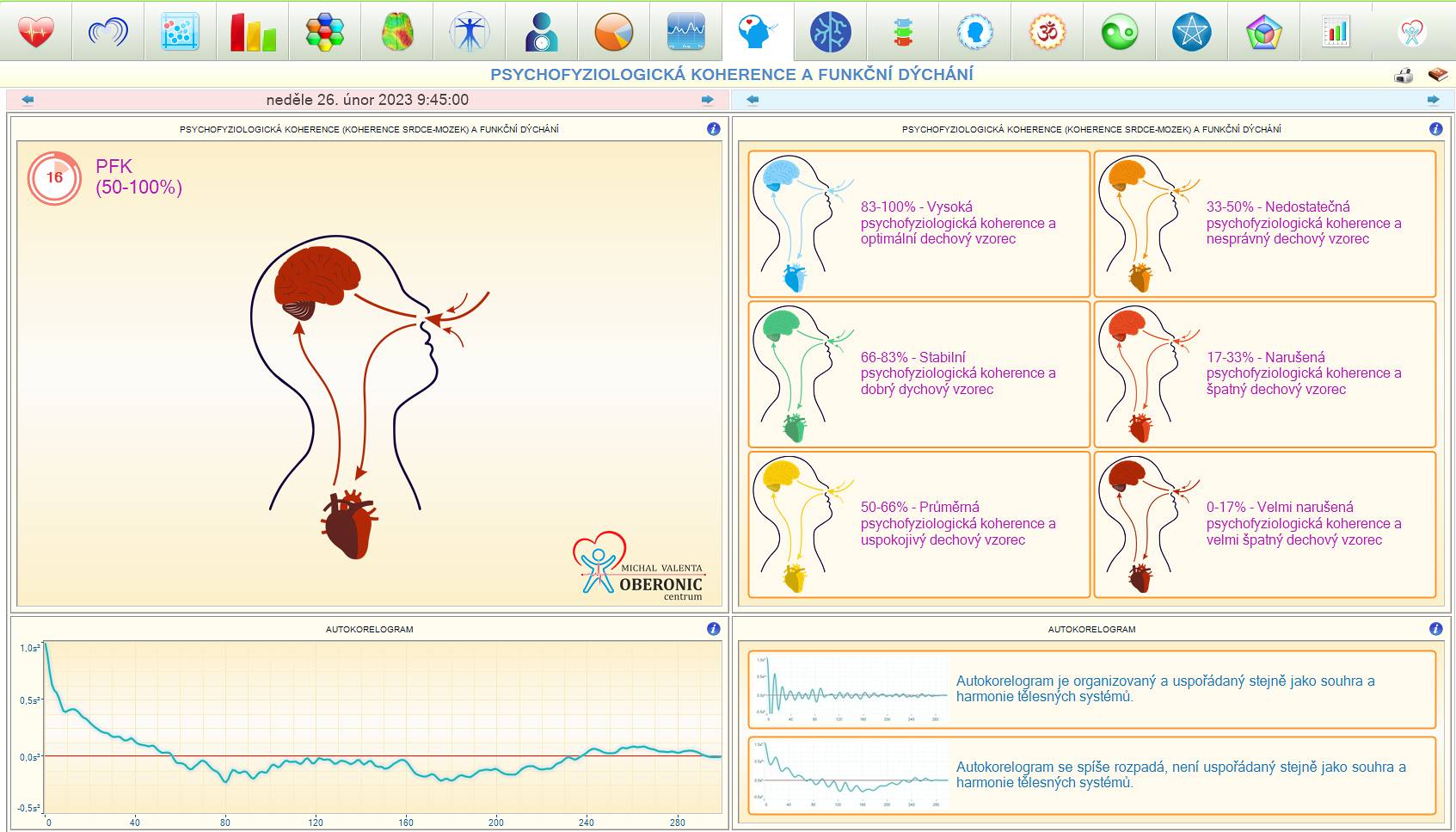
The panel focuses on the relationship between breathing and heart rate. It contains an indicator of psychophysiological coherence (PFK), respiratory sinus arrhythmia and autocorrelogram (ACF), which describes the orderliness of the rhythm. It is intended for monitoring the reaction during breathing exercises, relaxation and meditation.
Indicators of coherence, functional breathing and autocorrelogram. They make it possible to monitor heart rhythm changes while working with the breath.
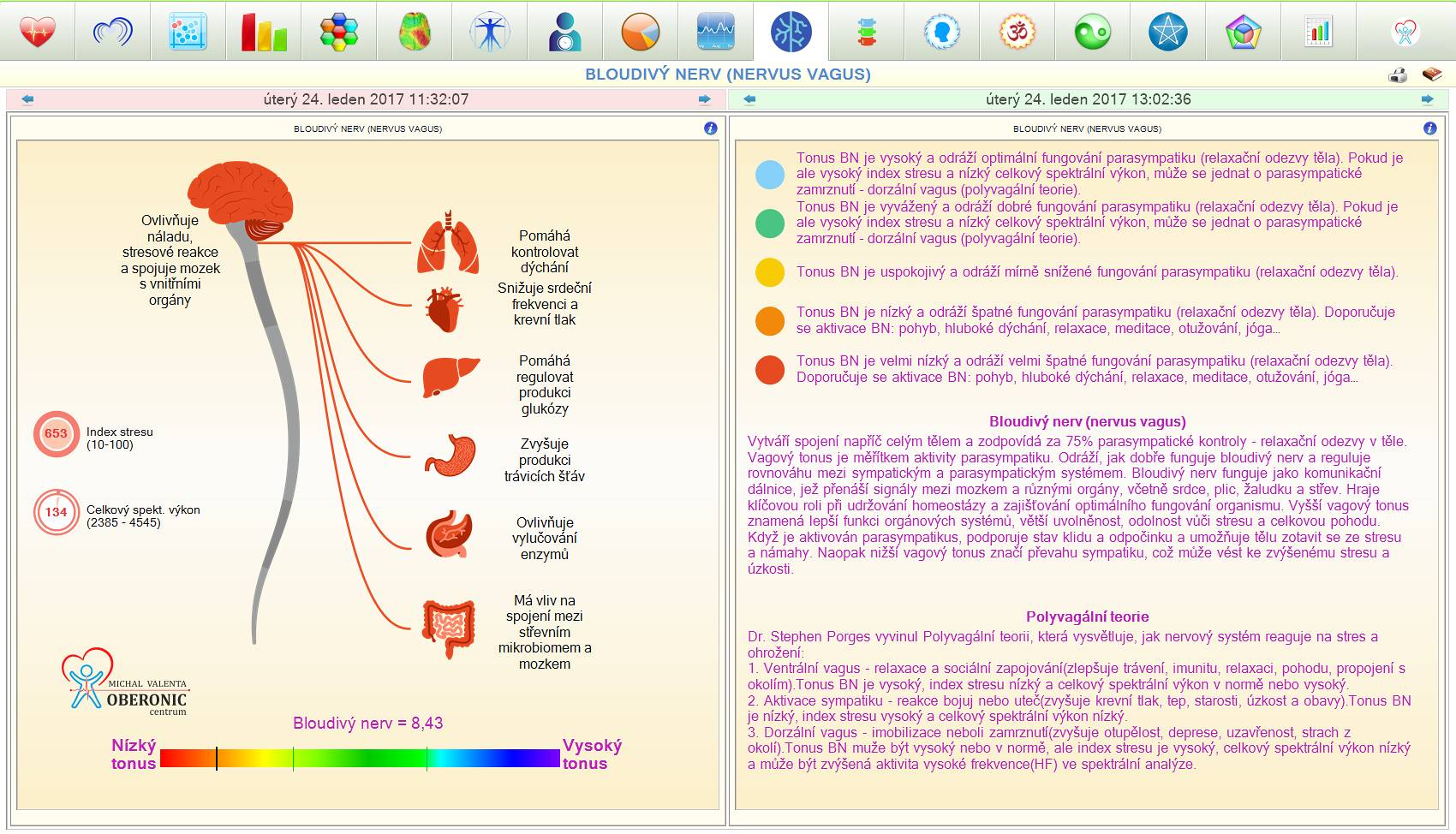
12. Vagus nerve
The software combines an estimate of vagal tone with the stress index and spectral power. It also interprets the result within polyvagal theory, which describes states of safety and social connection, mobilization or shutdown. This is an interpretation of HRV; the panel does not directly measure individual branches of the vagus nerve.
Overview of vagal tone and related indicators. It serves for orientation in the software interpretation of neural regulation.
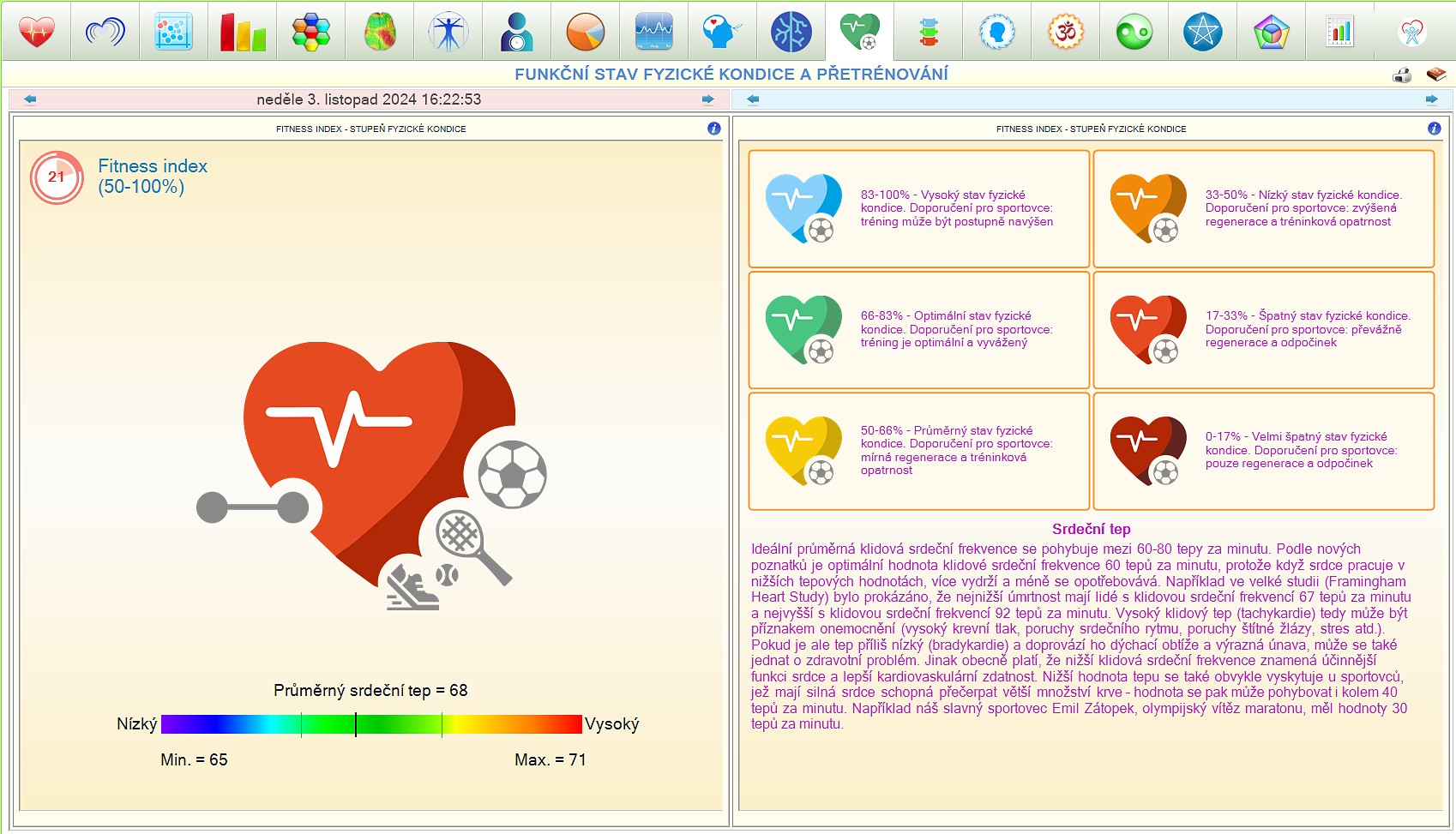
13. Physical fitness
Fitness index and adaptation indicators complement the average heart rate overview. The panel is aimed at monitoring fitness, reactions to training and development under stress. Resting heart rate is evaluated in the context of age, training and current condition; a low or high value alone does not determine the diagnosis.
Fitness index and heart rate indicators. The screen helps to compare fitness and responses to physical stress.
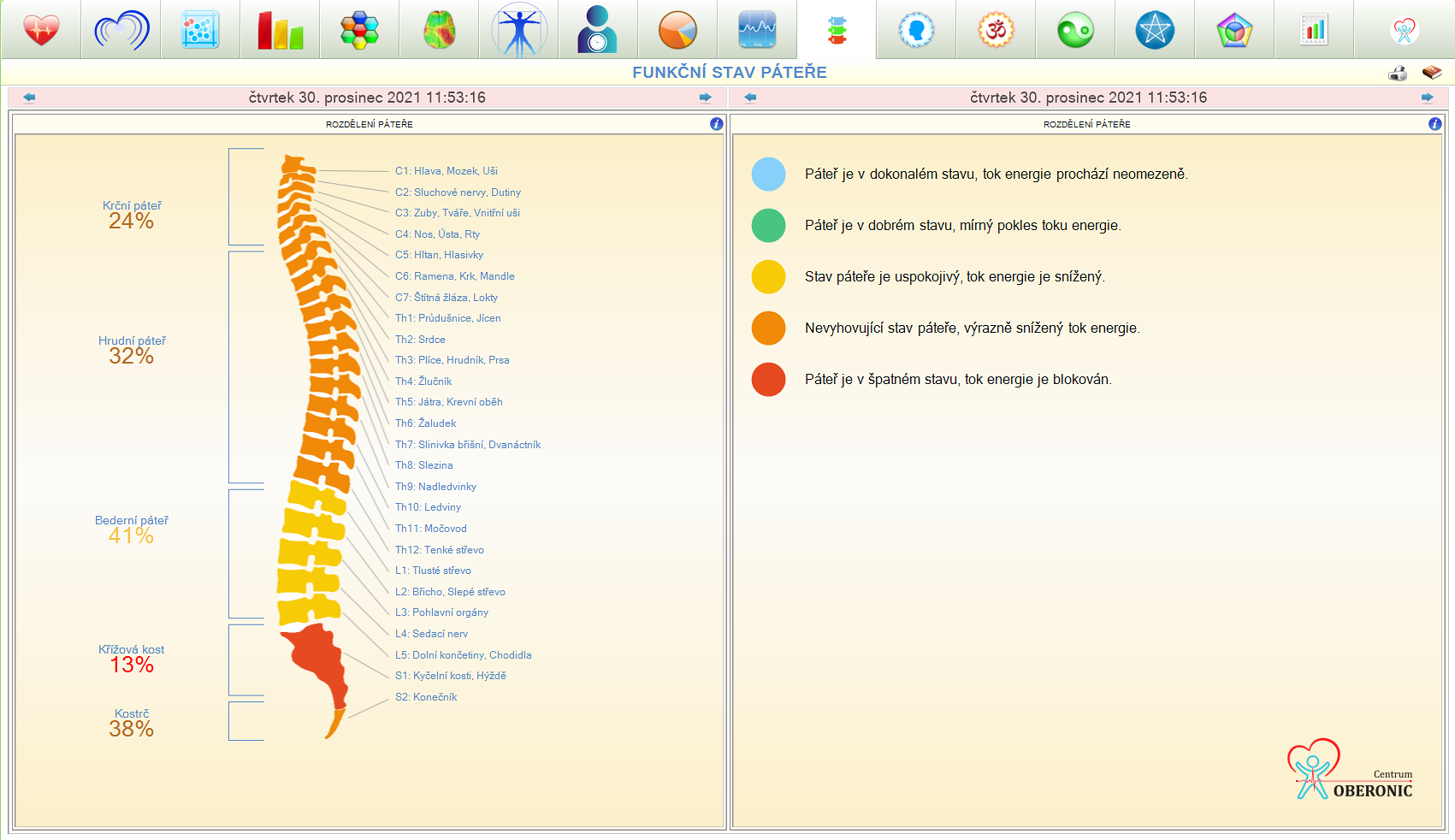
14. Functional state of the spine
This panel uses a holistic and psychosomatic model of the connections between spinal sections, organs and experience. The cervical and thoracic area connects with thinking and emotions, the lumbar area with support and certainties, the sacral area with vitality. It is an interpretive map; HRV does not provide an anatomical image of the vertebrae or evidence of their damage.
Spine model with marked sections and their overall connections. It serves as an aid for working with the interpretation model.
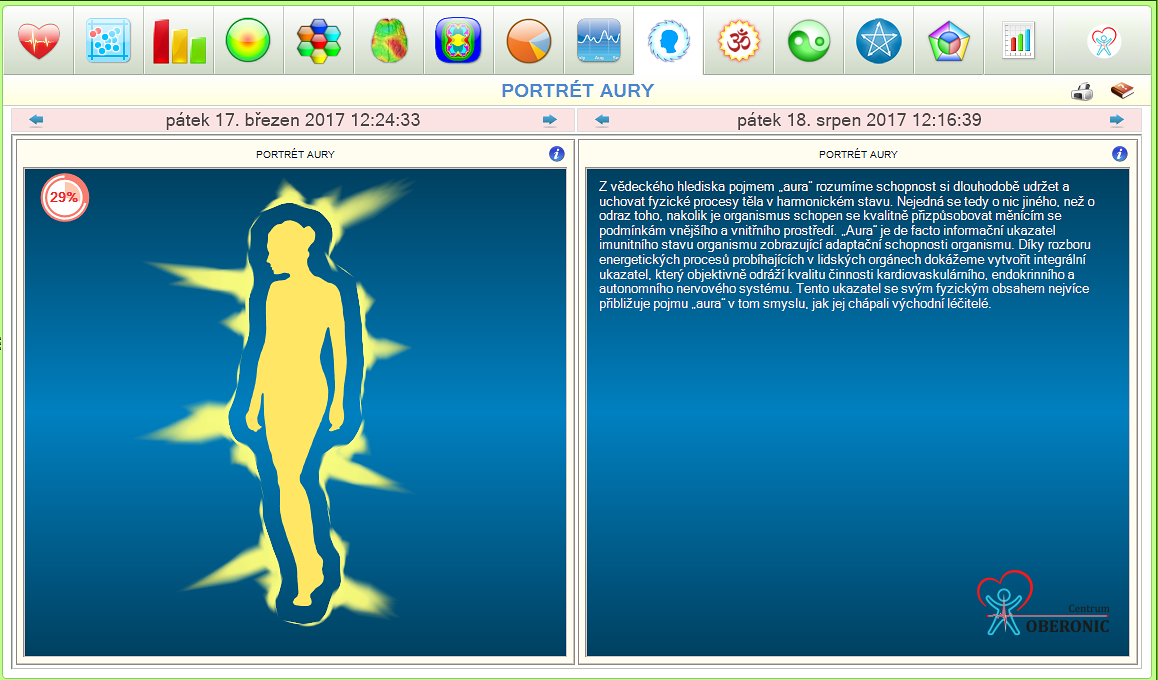
15. Aura Portrait
The software converts the selected indices into a color image around the human silhouette. The color and density of the field changes according to its model evaluation. This visualization represents a symbolic summary of the results that can facilitate the conversation with the client; it is not a photograph or a direct physical measurement of the aura.
Color portrait around human silhouette. Symbolically displays a summary of selected software indexes.
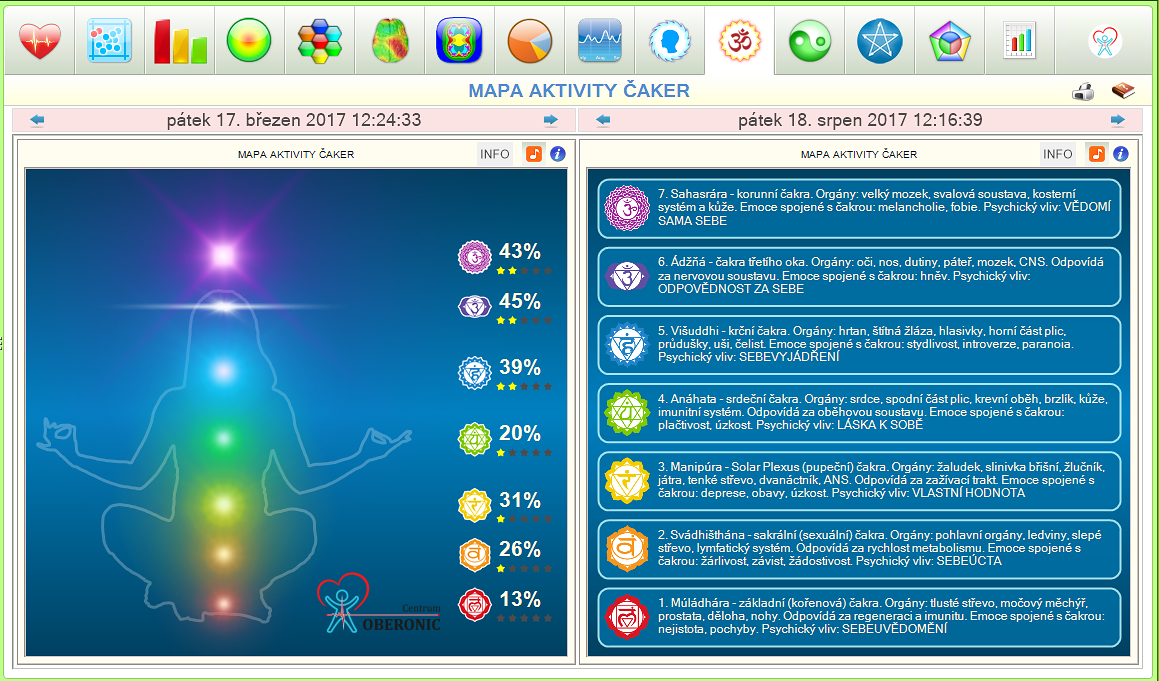
16. Chakra Activity Map
The map matches the measured data to the energy center model. It offers interpretation and recommendations for working with this holistic approach to individual chakras. It includes the possibility to create an individualized MP3 sound recording intended for relaxation. The output uses an energy interpretation model.
Chakra Map and Related Interpretation. The panel connects a holistic interpretation with the possibility of creating a relaxing recording.
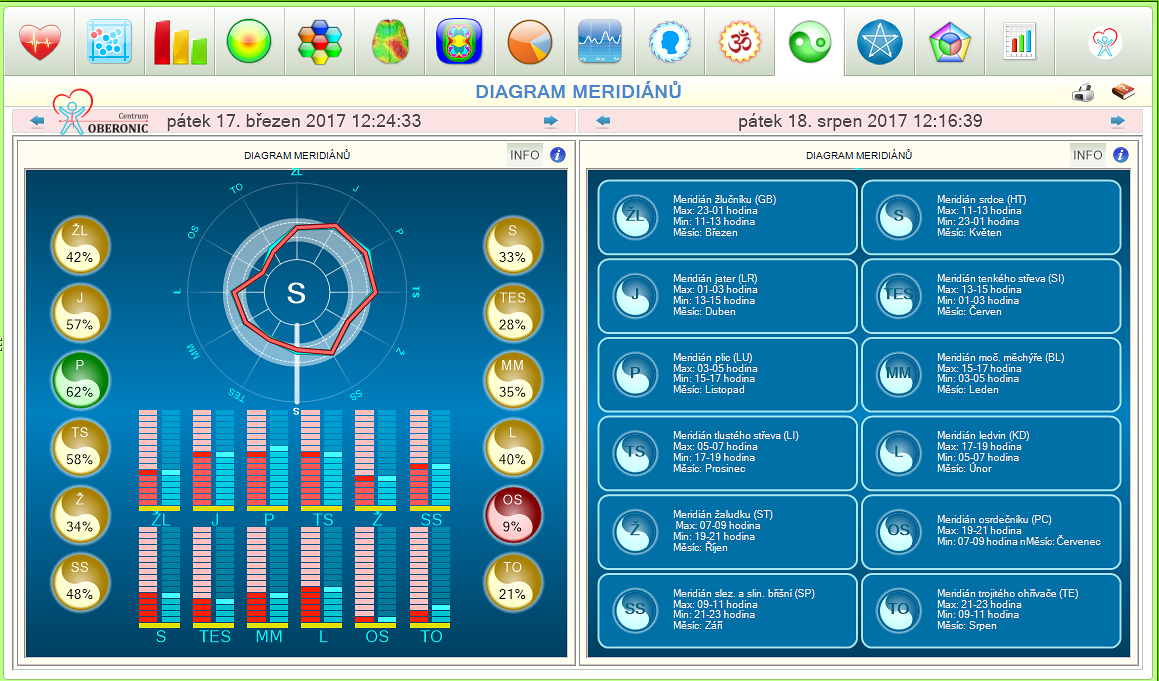
17. Diagram of meridians
The diagram is based on traditional Chinese medicine. The blue and red curves model the energy intake and output during a 24-hour cycle. Organ clocks highlight the currently active meridian, and bar graphs allow you to compare individual pathways. It is a TCM model, not a direct examination of the function of individual organs.
Meridian Diagram, Organ Clocks and Bar Indicators. It serves for orientation in the model of traditional Chinese medicine.
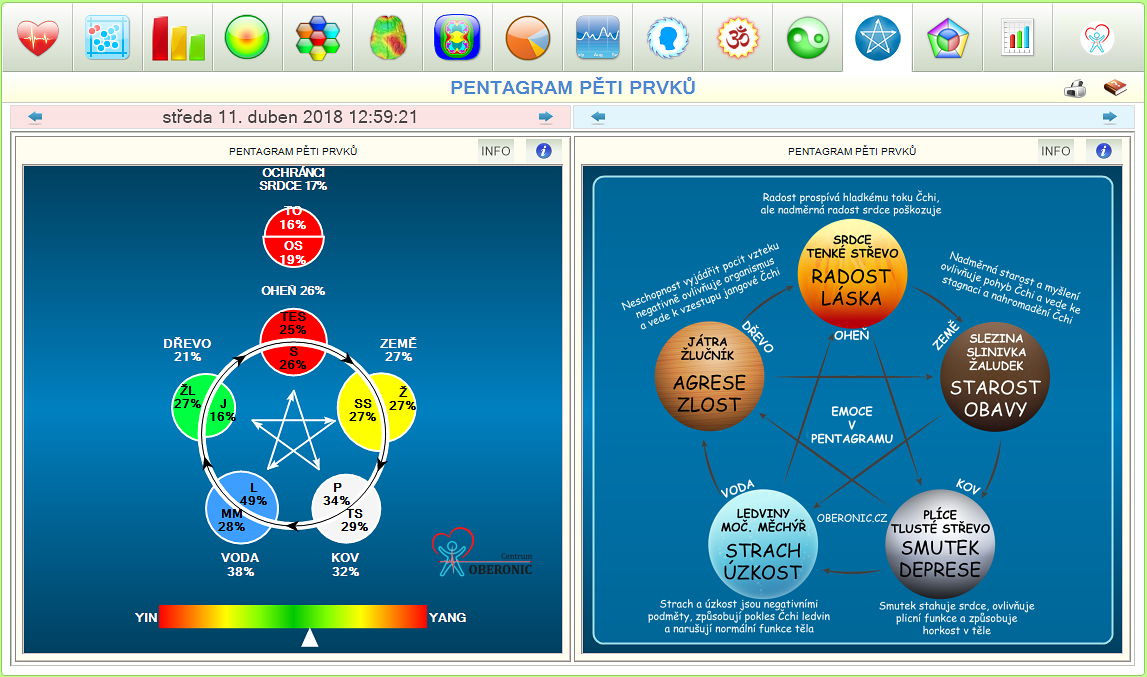
18. Pentagram of five elements
The five elements—Wood, Fire, Earth, Metal, and Water—frame this panel. The diagram shows their interrelationships and model balance. The emotional pentagram complements the connections with experience; the descriptions of the individual elements support the interpretation within the framework of traditional Chinese medicine.
Pentagram of the five elements and their relationships. It allows you to browse the overall interpretation, including emotional contexts.
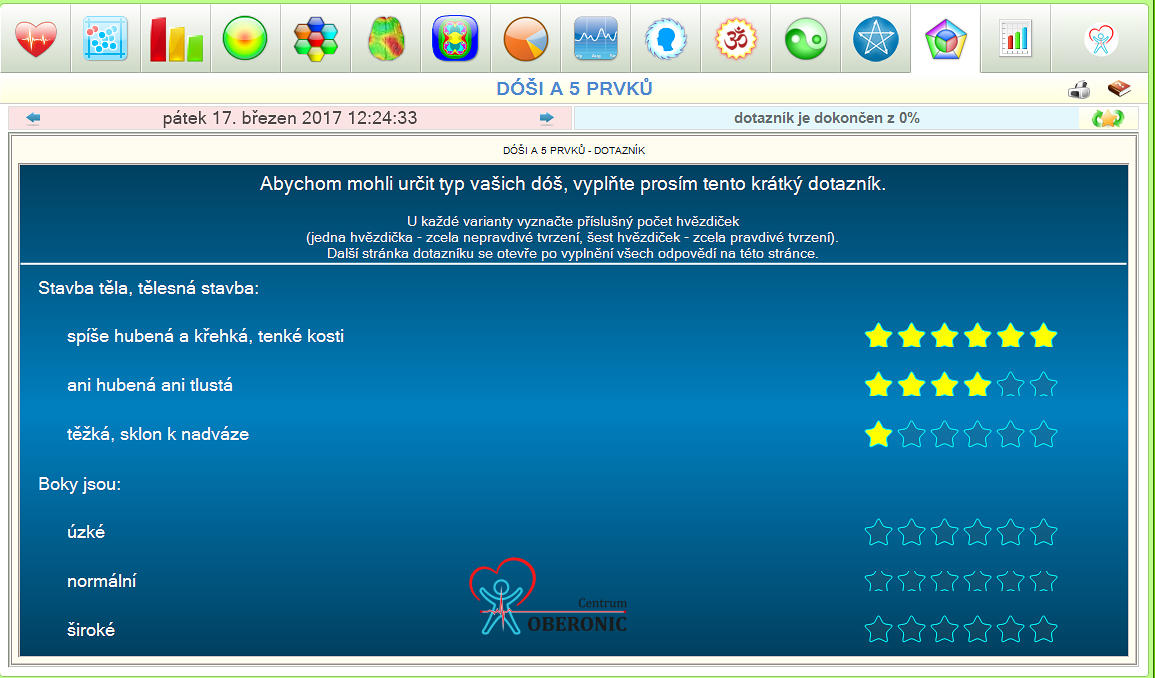
19. Dosha test
The Ayurvedic questionnaire works with the three principles of Vata, Pitta and Kapha. Its assessment describes the constitutional type and the relationship of the five elements: Ether, Air, Fire, Water and Earth. The results are followed by diet and lifestyle recommendations within the Ayurvedic model.
Ayurvedic constitution questionnaire and evaluation. It complements the work with HRV with a separate holistic approach.
20. Overview of HRV parameters
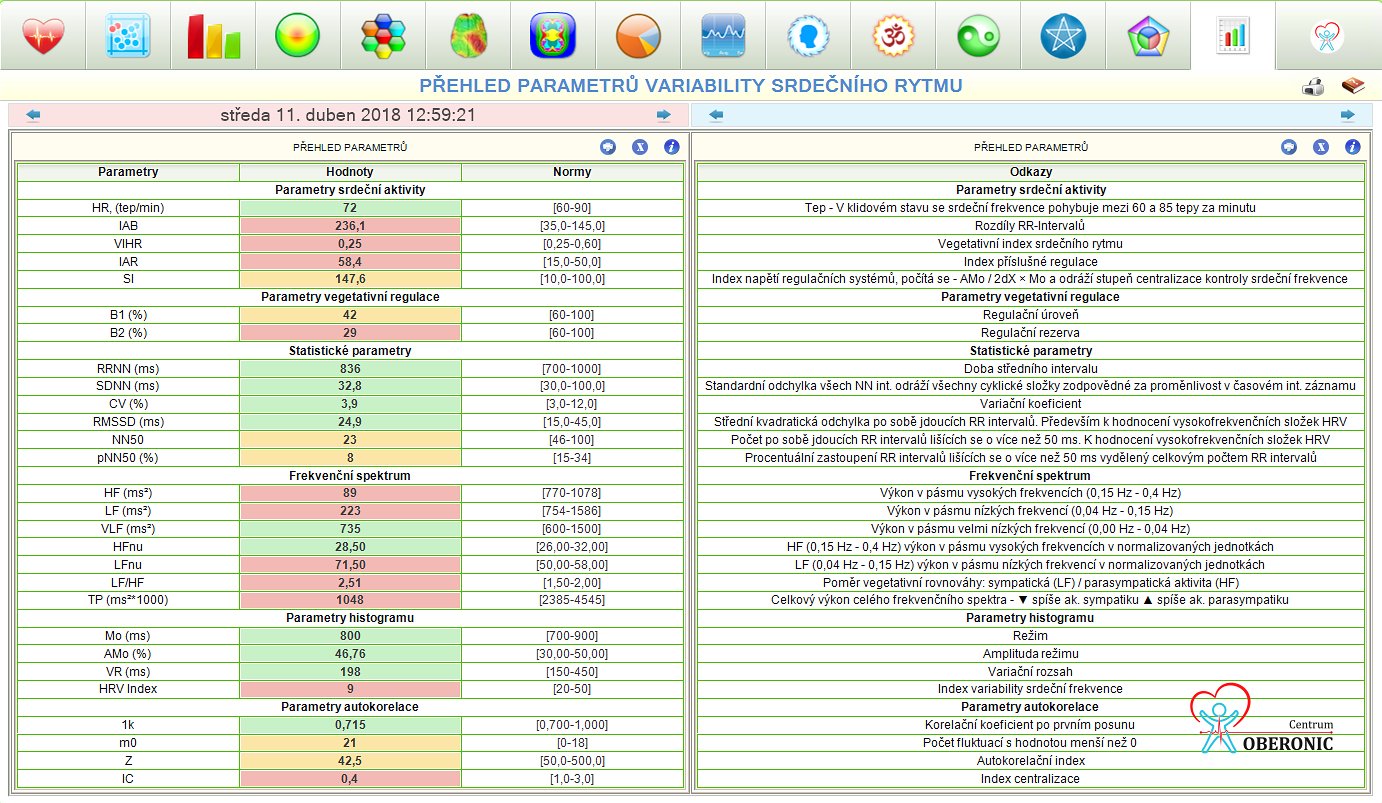
Tabular output offers mathematical and statistical indicators such as SDNN, RMSSD and pNN50. A brief explanation of the parameters helps with professional interpretation. The panel is suitable for users who want to work with specific values in addition to summary charts and compare the same indicators between records.
HRV parameter table with values and explanation. It is used for more detailed work with measurement results.
HRV MONITORING • DINAMIKA
Breathing biofeedback and relaxation
Monitor heart rate response to breath work. Biofeedback combines exercise with immediate feedback from measurements.
Controlled breathing and exercise recording
The BFB function allows controlled breathing to be initiated and recorded. The exercise record can be saved for further work with the client. The PFK panel complements the look at the coherence and orderliness of the rhythm; the chakra map offers a separate option to create a relaxing MP3 recording.
Choose the exercise procedure according to your training and your own comfort. The point is to work with the body's reaction and regular relaxation.
HRV MONITORING • DINAMIKA
Dinamika: equipment, pricing and support
Device, software, accessories and Czech training. Complete the order in the ZAPPER-CENTRUM.cz e-shop.
What's included in the kit
• Software in Czech, Slovak, Polish and English
• Single-channel ECG recording module – 1 piece
• Cardiographic electrodes Skintact F 9024 AC – 2 pieces
• USB‑C 2.0 connecting cable – 1 piece
• Device case
• Training and Czech instructions
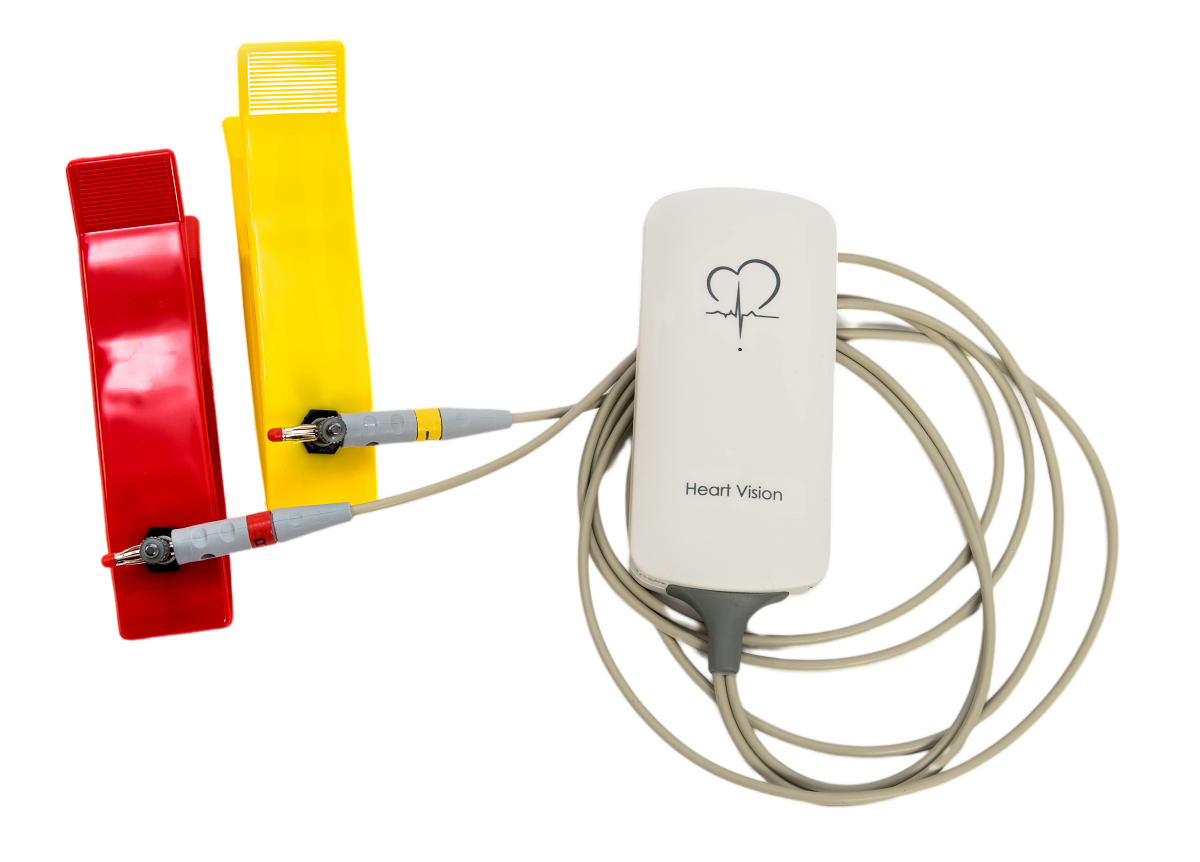
Recording module and electrodes for single-channel ECG acquisition. The module transmits the heart signal to a computer, where the software processes the intervals between contractions. Equipment photograph supplied with the product materials.
New module with USB‑C
The current build description lists the new recording module electronics and USB‑C interface. Work on Macs is listed through Parallels. The ability to use it with Android is described as a future expansion; it is not a confirmation of current mobile or tablet support.
PC requirements
• Microsoft Windows 10 or 11 operating system
• Intel Core i3 or AMD Ryzen 3 processor
• RAM of at least 4 GB
• At least 500 MB of free disk space
• Screen resolution of at least 1024 x 768 pixels
• USB 2.0 or 3.0
For Mac, use via Parallels is indicated. Please verify your specific computer, connection and configuration with us before ordering.
Laptop power during measurement
On some laptops, the power supply may interfere with the ECG recording. The supplier therefore recommends a suitable power supply with protective earthing. Follow the instructions for the device and the computer and contact technical support in case of signal problems.
Price and availability of Dinamika
The HRV system is listed at Zapper Store as HRV Screening HV for $5,600 USD, reduced from $6,600 USD. Price checked October 22, 2026. Confirm the supplied hardware, software licence, current availability and final order conditions on the product page. Contact support@zapper.store for equipment and order questions.
Dinamika for your practice and home measurements
Listed as HRV Screening HV at Zapper Store: $5,600 USD (previously $6,600). Price checked October 22, 2026. See the product page for current pricing, availability and order conditions.
Basic recording includes 300 heartbeats. This is usually around five minutes; the exact length depends on the heart rate and the selected mode.
Which languages are supported?+
Materials are available in Czech, Slovak, Polish and English. This website includes the English user manual. Contact us to confirm the interface language and training options for your version.
Can I use Dinamika on a Mac or phone?+
On a Mac, the stated setup uses Parallels. Android support is planned and is not a current compatibility claim. Please confirm your specific configuration before ordering.
What is respiratory biofeedback for?+
Allows you to monitor the heart rate response during controlled breathing and record the progress of the exercise. Complements work with relaxation and long-term records.
Does Dinamika replace a medical ECG?+
No. Dinamika analyzes heart rate variability and supports work with lifestyle changes. It does not replace medical care or a clinical multichannel ECG. For a heart examination, consult a physician.
Talk to us about Dinamika
Equipment selection and orders: support@zapper.store or +420 608 512 848. Technical support: +420 720 103 309.